



This guide stays focused on one thing only: how to withdraw from BC Poker correctly, what you need before you submit a request, how long the payout usually takes, and what to do if the request stays pending longer than expected.

Withdrawal Methods Offered by BCPoker
For BC Poker, the withdrawal flow is built around crypto payouts. In practice, that means you send funds from your balance to an external wallet address that supports the same asset and the same network selected in the cashier. The withdrawal screen can also show network-specific options for the same asset, so the method you see is the one currently enabled for your account and region.
The main withdrawal formats you should expect are:
Withdrawal Methods
Go and Withdrawal

That last point matters more than many players expect. If a coin needs a memo, destination tag, or payment ID, leaving it blank can turn a routine cashout into a long support case.
Supported Cryptocurrencies
The live cashier is the final checkpoint for what is available at the moment you withdraw, but the broader product flow supports major crypto assets and popular blockchain networks.
Common examples include: BTC, ETH, DOGE, TRX, XRP, UNI, and other supported tokens shown directly in the cashier.
That does not mean every account always sees the same list. Availability can depend on the current cashier setup, the selected network, and the method enabled for your account. The safest move is to choose the asset inside the withdrawal screen first, then copy the destination address from the matching wallet.
Requirements Before Making a Withdrawal
The first part of BC.Poker withdrawal rules is account readiness. Your email should be verified, you should be using only one account, and your profile should be ready for identity checks before the first payout. If additional confirmation is needed, the BTC Poker platform can ask for KYC, updated details, or a verification code before the request is released.
In practical terms, BC Poker withdrawal rules also mean using the correct wallet details, choosing the right chain, keeping enough balance for the request and its costs, and completing any security step immediately. Most preventable delays happen because a player rushes through the form instead of treating the review screen as the final checkpoint.
Before you withdraw, make sure you have all of this ready:
| 📧 A Verified Account Email |
| ☝️ One Active Account Only |
| 🔍 Completed KYC If Requested For Your First Payout |
| 📌 The Exact Wallet Address For The Selected Coin |
| ⚡ The Correct Network For That Wallet |
| 🏷️ Memo, Tag, Or Payment ID If The Asset Needs One |
| 🛡️ Access To Your Security Confirmation Step |
These basics save time because they remove the most common approval blockers before the request is even submitted.
Step-by-Step Guide to Withdraw from BCPoker
The easiest way to withdraw is to prepare the receiving wallet before you open the cashier. When the destination is already copied from the correct wallet, you are much less likely to choose the wrong chain or paste the wrong details.
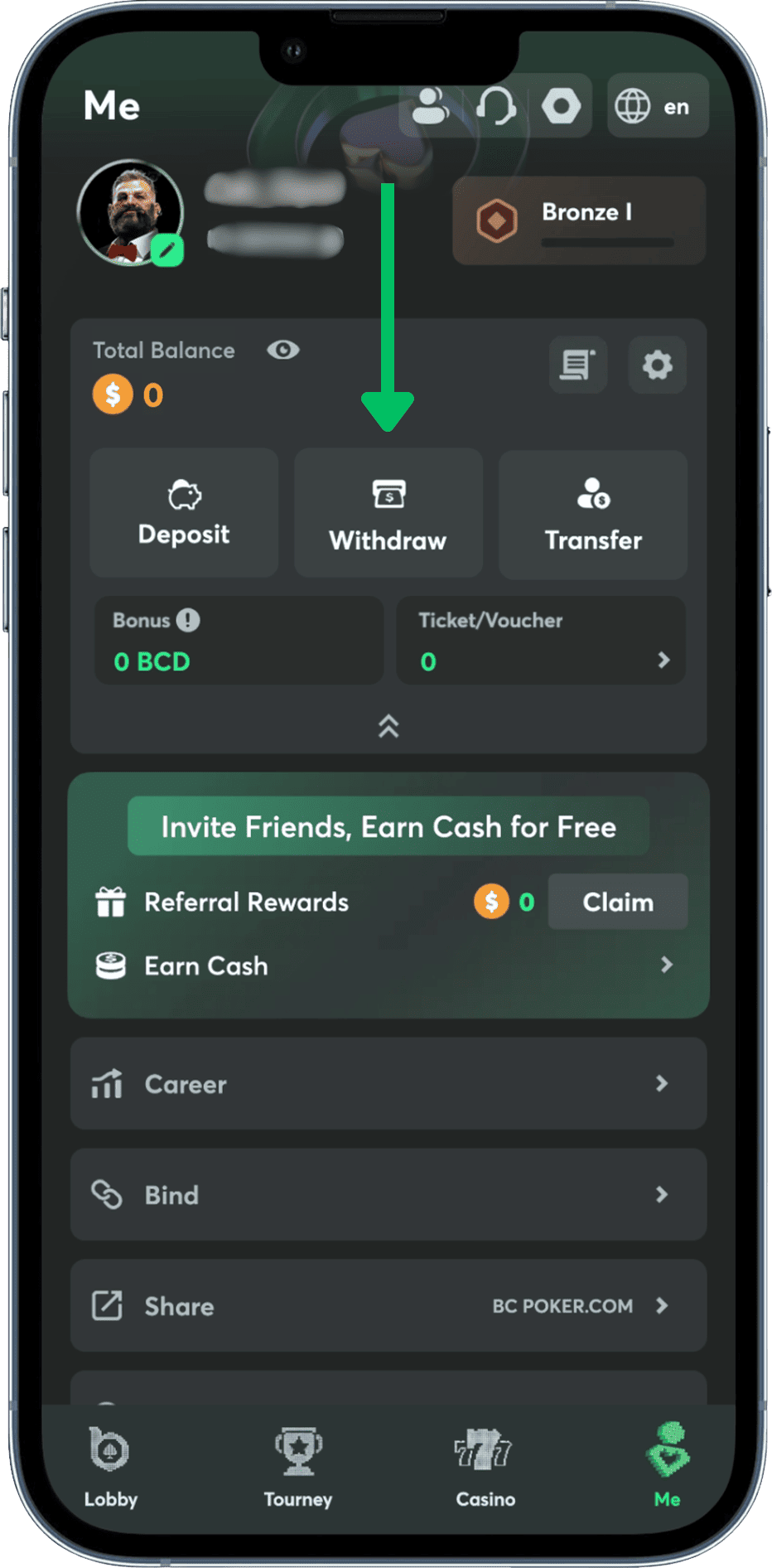
1. Sign in and open the cashier: Go to your account, open the wallet or cashier area, and switch to the withdrawal section. If your email is still not verified, fix that first so the payout flow is not blocked at the start.
2. Choose the coin you want to withdraw: Select the asset that matches the wallet where you want to receive the funds. Do not choose the coin first and think about the network later. Those two choices belong together.
3. Select the correct network: If the same token is available on more than one chain, pick the network that your receiving wallet actually supports. A mismatch here is one of the fastest ways to create a stuck or delayed cashout.
4. Paste the destination address carefully: Copy the wallet address from your receiving wallet and paste it into the withdrawal form. This is where many players catch a BC Poker withdrawal problem before it costs time, because a last-second manual check often reveals a missing character or the wrong wallet type.

5. Add a memo or tag if required: Some assets need more than a wallet address. If your receiving wallet shows a memo, tag, or payment ID, enter it exactly as displayed. Skipping that field can break an otherwise valid payout.
6. Enter the withdrawal amount: The withdrawal form shows the amount field, and this is also where you usually see the minimum threshold for the selected asset. Always review the amount after fees and network costs so the final received balance is not a surprise.
7. Review and confirm the request: Check the method, amount, coin, network, address, and any extra routing field one more time. Then complete the security prompt, which can include two-factor confirmation or a verification code for sensitive actions.
8. Track the payout in your history: After confirmation, the request moves into processing and can be followed in your cashier history. That history is the first place to check if you want to know whether the payout is still waiting for approval or has already moved forward.

BCPoker Withdrawal Limits and Fees

Minimum withdrawal is shown in the cashier for the selected coin, and for major cryptocurrencies the working baseline starts from the equivalent of 20 USDT. That means the amount you see on the screen matters more than any old number copied from a random guide.

There is no single fixed ceiling that covers every asset and every account in the same way, so large requests should always be checked against the live cap shown at the moment of withdrawal.

BC.Poker withdrawal fee shown during the withdrawal flow is only one part of the cost, because external blockchain network fees are separate and depend on the chain you choose at that moment.
Minimum and Maximum Withdrawal Amounts
Minimums protect the system from dust transactions and are tied to the asset you selected. Maximums work differently. They reflect the active method, the current cashier settings, and the status of your account, which is why the visible limit in the withdrawal form is the number that matters.
Network Fees and Processing Costs
Cheap withdrawal can become expensive if you choose a busy chain. Network congestion changes the blockchain cost outside the platform, so it is worth checking the displayed fee before you confirm. Players who want lower costs can get the smoothest result by picking the correct asset, avoiding unnecessary conversions, and using supported network.
BCPoker Withdrawal Processing Time
BC Poker withdrawal time is usually short when the request is approved without extra review and the selected blockchain is not congested. Once approval is done, the next stage depends on confirmations on the chosen network.



Common BCPoker Withdrawal Issues
Withdrawal problem usually has a clear trigger. In most cases, a BC Poker withdrawal issue comes from incomplete verification, wrong wallet details, the wrong network, or a request that is still under review.
Tips for Safe BCPoker Withdrawals
The safest habit is to follow BC.Poker withdrawal rules in the same order every time:
- Verify the asset and network
- Paste the wallet address, add the memo or tag if needed
- Review everything before confirming.
Those rules sound basic, but they prevent most avoidable mistakes. If the amount field, limit, destination details, or security step does not look right, stop and check it before you submit. In withdrawal flows, caution is faster than fixing a bad payout after the fact.