



A BC Poker deposit from wallet is the standard crypto funding route for players who already keep coins in a personal wallet or exchange account. The process is simple in structure: open the cashier, choose the coin you want to fund, copy the deposit details shown for that coin, send from your external wallet, and wait for blockchain confirmations before the balance updates.
This article stays focused on the practical side of the flow. You will see how wallet deposits work, what kind of wallet setup is suitable, how to complete each step correctly, what usually causes delays, and how to protect both the wallet and the funds during the transaction.

How Wallet Deposits Work and Why They’re Convenient
Wallet deposits work by linking your external crypto funds to the deposit details generated inside the cashier for the exact coin you choose. You select the coin on the platform, copy the wallet address shown there, and send the same asset from your personal wallet or exchange wallet to that destination. After the transaction is broadcast, the funds move through blockchain confirmations and are credited once the required confirmations are complete.
That is why this method feels easy for many crypto users. A BC.Poker wallet deposit does not require card details, extra payment forms, or a separate banking step, and it fits naturally if you already store funds in a crypto wallet you control. The platform also promotes fast transactions and secure deposits, which makes wallet funding a convenient option for players who prefer direct crypto movement.
The practical advantages are easy to summarize:
| Advantage ⭐ | Why it helps 🔎 |
| Direct crypto transfer | You move funds straight from your wallet or exchange without card processing. |
| Familiar flow | If you already use crypto, copying an address and sending coins feels routine. |
| Broad asset support | The ecosystem supports multiple major coins and token types. |
| Good for active crypto users | It fits players who keep balances in crypto rather than fiat methods. |
| Clear status logic | You can follow the transfer from send action to blockchain confirmation to crediting. |
Those benefits come directly from the way the deposit flow is set up: select a coin, copy the destination, send the funds, and wait for confirmation. This differs from a deposit from bank card.
Setting Up Your Wallet for BCPoker



Step-by-Step Guide to Depositing From Wallet
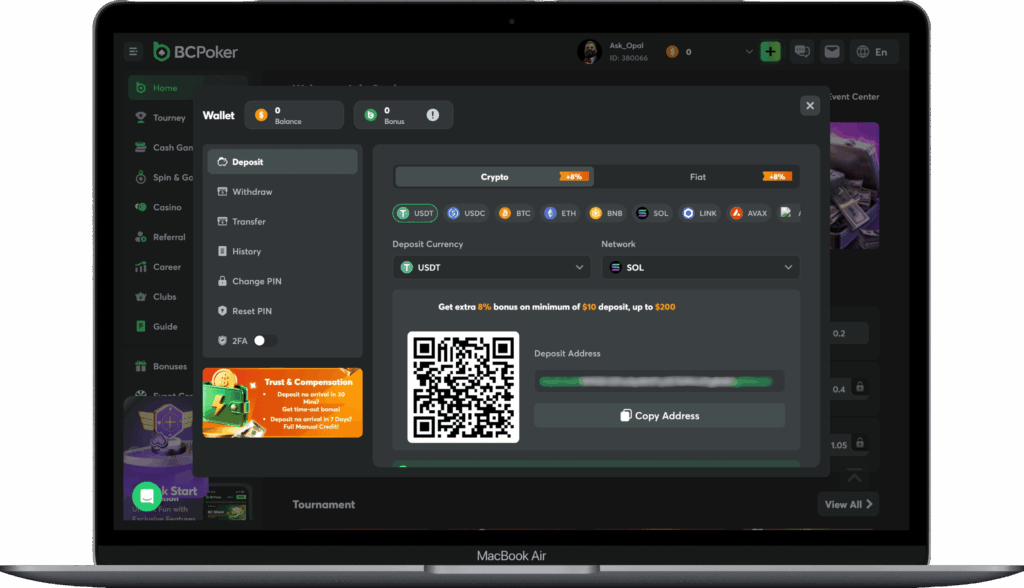
A wallet deposit BC Poker flow is short when you follow the correct order. The simplest routine is to prepare the sending wallet first, then open the cashier, match the coin carefully, and only send after checking the deposit details one more time.

Sign in to your account and open the wallet area next to your balance. From there, move to the deposit section where the available funding options are shown and choose the crypto route instead of other payment methods.

Select the exact asset you want to fund inside the cashier. This choice matters because the address shown on the next screen is generated for that specific coin, so you should not plan to send a different asset later from the external wallet.

Once the coin is selected, the platform shows the deposit address for that asset. Copy it carefully, and if the screen also displays a memo, tag, or payment ID, copy that too because some coins need more than an address to route the deposit correctly.

Go to your personal wallet or exchange wallet, select the same coin, and start a send transaction. Paste the address you copied from the cashier, add the amount you want to transfer, and enter the memo or tag if the asset requires it.

Review the amount, address, network, and any extra routing field before you approve the transfer. This part matters because most deposit mistakes begin with a mismatch between the selected coin in the cashier and the transfer details used in the sending wallet.

After you send the funds, the deposit goes through blockchain confirmations before it reaches the balance. A completed send in your wallet does not always mean an instant credit, give the transaction time to finish the required confirmations.

Troubleshooting Common Deposit Issues
A BC.Poker deposit from wallet usually fails or stalls for a small number of repeat reasons. Most cases come down to mismatched coin selection, wrong network, missing memo or tag, slow confirmations, or a transfer that was sent correctly but has not yet finished processing on-chain.
- I sent the wrong coin
Deposits should be sent in the same asset that was selected in the cashier, so using a different coin can stop the credit from posting normally. - I used the wrong network
A network mismatch can prevent the deposit from being recognized correctly, so always match the sending network to the one expected by the deposit flow. - I forgot the memo or tag
Coins that use memo, tag, or payment ID fields need that extra detail, and leaving it out can delay or complicate crediting.
- The wallet sent, but the balance unchanged
This often means the transaction is still waiting for enough blockchain confirmations or for the system to finish updating the status. - I sent ETH in the wrong transfer format
The deposit guidance warns that smart contract deposits for ETH are not compatible, so a normal supported transfer method should be used instead. - I want to resend immediately because nothing appeared yet
That is usually a bad idea. Check the transaction hash, confirm the address and network, wait for confirmations.
If it still didnt help, only then contact support with the full details if the status still does not move.
How to Protect Your Wallet and Funds
A BC Poker wallet deposit is safest when you treat the sending step as irreversible and review everything before approval. BC Poker login, double-check the address, verify the selected coin, make sure the network is correct, and use a small test transfer first if the amount is large enough to make caution worthwhile.
The wallet itself deserves the same level of care. Keep control of your recovery phrase, protect access to the device you use for transfers, and avoid rushing through a send screen just because the deposit flow looks simple. If you keep your wallet secure and your transaction details accurate, a second BC Poker deposit from wallet is usually just as smooth as the first.
The platform side also has visible trust signals. BC Poker maintains Proof of Reserves covering user assets 1:1 with additional reserves, uses a decentralized audited RNG system for fairness, and operates under an Anjouan Gaming License with AML compliance measures. Those factors do not replace wallet safety on your side, but they do help explain why the deposit environment is positioned as secure and reliable.